
IM FUNCTIONAL ACTIVITY BOARD
RESOURCE CENTER
Setup resources, activity ideas, downloadable materials, and more ways to make the most of your Functional Activity Board.
GET THE MOST FROM YOUR FUNCTIONAL ACTIVITY BOARD
Find the tools and resources you need to put your board to work in your IM sessions.
- Get set up with the Quick Start Guide
- Explore activity ideas for cognitive + motor integration
- Download additional activity cards and stimuli
- Access support resources whenever you need them
GETTING STARTED
Everything you need to get your Functional Activity Board set up and ready to use.
- Set up your board for floor, tabletop, or wall use
- Connect the wireless transmitter
- Learn how to properly clean and store your board
- Review guidelines for using activity cards and other stimuli
ACTIVITY IDEAS
Bring cognitive and motor challenges together with activities designed to build on the IM training you’re already doing.
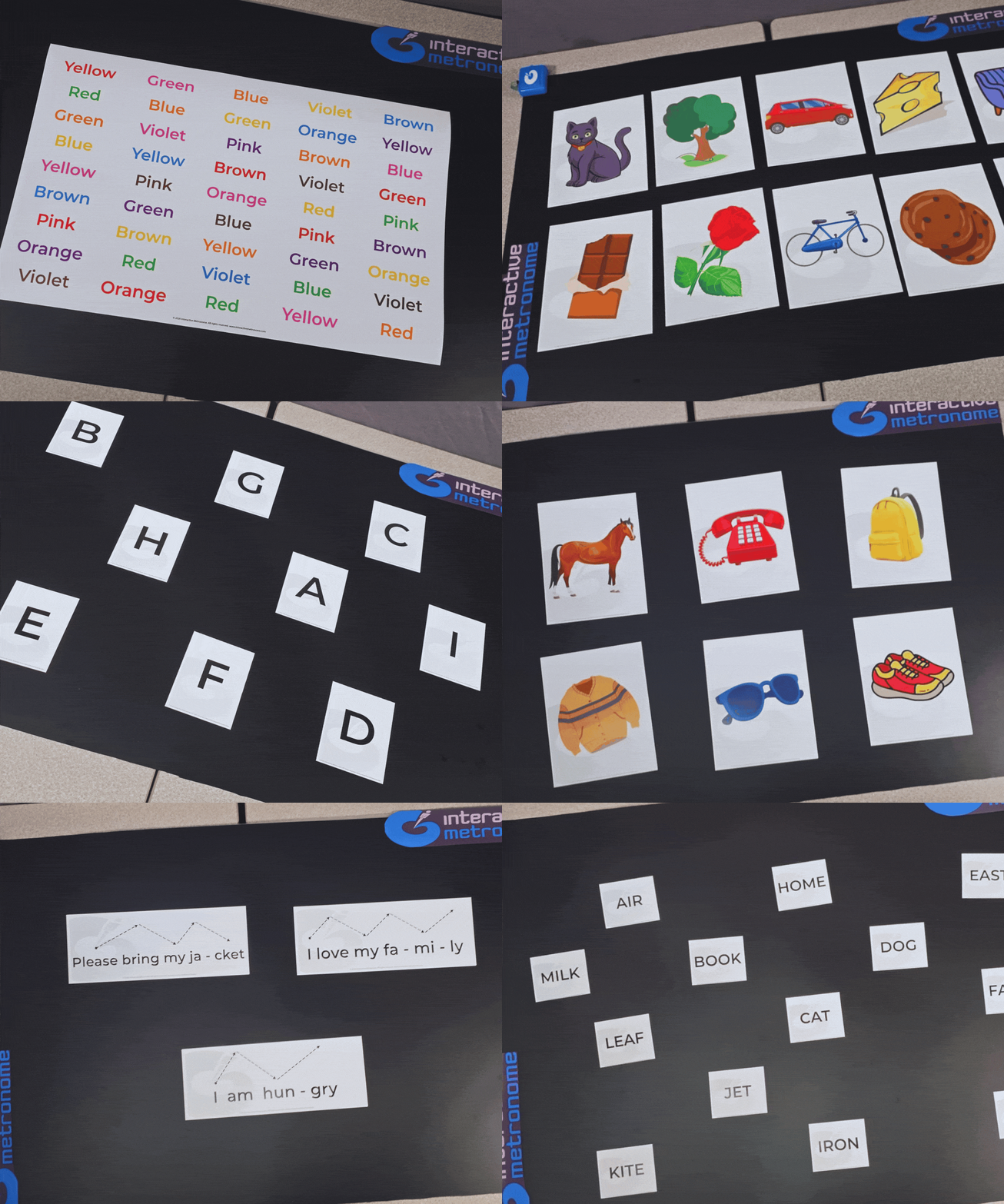
- STROOP & Cognitive Flexibility — add inhibition, attention, and response-selection demands
- Sequencing & Working Memory — incorporate ordered movements, numbers, letters, or multi-step tasks
- Naming & Language — pair timing with word retrieval, categorization, naming, or fill-in-the-blank tasks
- Visual & Motor Challenges — use colors, shapes, arrows, and spatial targets to vary movement and visual processing
- Dual-Task Activities — combine movement, timing, and cognitive demands within a single activity
SUGGESTED ACTIVITY PROTOCOLS
Explore the protocols below for practical ways to put these concepts into action.
Supplemental Use Guide
1. Alphabet Sequencing Protocol
Target Skills: Processing speed, working memory, cognitive flexibility, divided attention
Level 1 – Visual Sequencing
- Lay out 5 word cards randomly.
- Patient taps the words in alphabetical order.
- Focus on accuracy and rhythmic consistency.
Level 2 – Verbal + Motor Synchronization
- Patient taps the words in alphabetical order.
- Patient says each word aloud in synchrony with the tap.
- Maintain timing accuracy.
Level 3 – Same-Letter Discrimination
Use words that share the same first letter (e.g., cat, coat, cent, cut, city).
- Patient taps in alphabetical order.
- Add verbal output and rhythmic synchronization.
2. Reverse Alphabet Protocol
Target Skills: Inhibition, cognitive flexibility
- Lay out 5–8 cards.
- Patient taps in reverse alphabetical order.
- Advanced: Add verbalization while maintaining rhythm.
3. Category Suppression Protocol
Target Skills: Selective attention, inhibitory control
- Lay out 8–12 mixed word cards.
- Patient taps all words except a specified category (e.g., animals, food, vehicles).
- Advanced: Maintain metronome synchronization while filtering.
4. Alternating Category Protocol
Target Skills: Task switching
- Lay out 8–10 cards.
- Patient alternates tapping between two categories (e.g., animal → object → animal → object).
- Maintain timing accuracy.
5. Syllable Timing Protocol
Target Skills: Phonological processing, motor coordination
- Patient taps once per syllable of each word.
- Example: banana (3 taps), umbrella (3 taps), violin (3 taps).
- Maintain rhythmic consistency.
6. Working Memory Challenge
Target Skills: Short-term memory, sequencing
- Present 5 cards.
- Remove 1–2 cards.
- Patient taps remaining cards in alphabetical order from memory.
- Advanced: Patient verbally identifies removed words before tapping.
Sequencing
Basic:
Place 3–5 object cards in front of the patient. Ask the patient to arrange the objects in a logical order while maintaining synchronization with the IM beat. Example: coffee → mug → drink or shoes → bike → helmet depending on the scenario.
Advanced:
Increase the number of cards and require the patient to explain the sequence verbally while maintaining synchronization. Alternatively, have the patient reorder the sequence after you shuffle the cards.
Functional Use
Basic:
Show the patient an object card and ask them to state its primary use while maintaining synchronization with the IM beat.
Example:
Hammer → used for pounding nails.
Advanced:
Ask the patient to generate multiple uses for the same object while maintaining synchronicity.
Example:
Hammer → pounding nails, removing nails, breaking objects.
You may also introduce less obvious uses to increase cognitive flexibility.
Category Sorting
Basic:
Provide a set of object cards and ask the patient to group them into categories while maintaining synchronization with the beat.
Example categories:
- Animals
- Food
- Tools
- Transportation
- Weather/Nature
Advanced:
Increase the number of cards and allow the patient to generate their own categories.
Example: Objects that are used outdoors, found in a kitchen, or require electricity.
Description
Basic:
Show the patient an object card and have them describe the object using two attributes while maintaining synchronization.
Examples:
- Color
- Size
- Texture
- Function
Advanced:
Have the patient describe the object without naming it while the clinician attempts to guess the object.
Example:
“It is round, cold, and used to cool drinks.”
Similarities and Differences
Basic:
Present two object cards and ask the patient to identify one similarity or difference while maintaining synchronization.
Example:
Cat vs Dog → both are animals.
Advanced:
Ask the patient to identify multiple similarities and differences between the objects or explain how the objects are used differently.
Association
Basic:
Show an object card and ask the patient to state the first item they associate with it while maintaining synchronization.
Examples:
- Coffee → mug
- Bike → helmet
Advanced:
Ask the patient to create a short sentence or scenario involving the object.
Example:
“I ride my bike to the park.”
Odd-One-Out
Basic:
Present 3 object cards and ask the patient to identify which item does not belong while maintaining synchronization.
Example:
Cat – Dog – Pizza → Pizza does not belong.
Advanced:
Increase the number of cards and ask the patient to explain their reasoning.
Rapid Naming
Basic:
Lay out multiple object cards and have the patient name each object as quickly as possible while maintaining synchronization with the beat.
Advanced:
Add rules such as:
- Name only animals
- Name only foods
- Skip certain objects
This increases cognitive control demands.
Story Generation
Basic:
Present 2–3 object cards and ask the patient to create a short sentence that includes all items while maintaining synchronization.
Example:
“The cat climbed the tree.”
Advanced:
Use 4–5 object cards and ask the patient to create a short story involving all items.
Word Completion / Contextual Word Retrieval
Basic
Provide the patient with a sentence missing the final word. The clinician reads the sentence aloud while maintaining the IM beat. The patient supplies the missing word while maintaining synchronous motor movement with the beat (clapping, stepping, tapping).
Examples:
- Drink a glass of ______
- The grass is ______
- The sky is ______
- Open the ______
- Drive the ______
The patient should produce the word on the beat while maintaining synchronization.
Advanced
Increase the complexity of the task by requiring the patient to generate the missing word without visual cues while maintaining synchronization with the beat.
Additional difficulty can be introduced by:
- Increasing sentence complexity
- Introducing less predictable sentence endings
- Providing multiple possible answers and asking the patient to select the most appropriate one
Example prompts:
- You wear shoes on your ______
- A bird can ______
- A clock tells ______
- A cat says ______
- You sleep in a ______
If the patient is unable to retrieve the word:
- Provide a written cue card with the answer.
- Provide 2–3 possible choices for the patient to select from.
- Provide the first sound or first letter of the target word.
Allow up to 10 seconds for retrieval before providing cues.
Additional Advanced Variation
Cognitive Flexibility Version
Provide multiple fill-in-the-blank cards and require the patient to alternate responses between cards while maintaining synchronization with the beat.
Example:
- The sky is ______
- Drink a glass of ______
- A cat says ______
- You sleep in a ______
The patient must respond on each beat while maintaining motor synchronization.
Memory + Fill-in-the-Blank (Dual Task)
Provide 3–4 fill-in-the-blank sentences for the patient to complete during the IM task. After the IM activity, ask the patient to recall the completed sentences.
Example:
- The sky is blue
- Drink a glass of water
- Open the door
This adds a working memory component to the word retrieval task.
Color–Word Interference / Cognitive Control
Basic
Present the patient with a set of color words printed in incongruent ink colors. The patient is instructed to state the color of the ink, not the word itself, while maintaining synchronous motor movement with the IM beat (clapping, stepping, tapping).
Examples:
- Word: Blue printed in red ink → Patient says red
- Word: Orange printed in yellow ink → Patient says yellow
The patient should respond on the beat while maintaining synchronization with the IM stimulus.
Advanced
Increase the complexity of the task by increasing the number of colors and stimuli presented. Continue requiring the patient to state the ink color while maintaining synchronization.
Additional difficulty can be introduced by:
- Increasing the total number of words presented
- Randomizing color placement to prevent predictable patterns
- Increasing the speed of presentation
Advanced Variations
Alternating Rule (Set Shifting)
Require the patient to alternate responses between stating the word and stating the ink color.
Example pattern:
- Word → say the word
- Next item → say the ink color
- Continue alternating
This increases cognitive flexibility and executive control.
Inhibition Challenge
Provide instructions that require the patient to suppress responses to specific colors.
Example:
- Do not respond if the color is red.
- Respond only if the ink color is blue or green.
The patient must maintain synchronization while monitoring for the target condition.
Rapid STROOP Naming
Have the patient move through the grid as quickly as possible while maintaining synchronization with the beat, naming the ink colors of each word in sequence.
Difficulty can be increased by:
- Changing the direction of reading (top-to-bottom, bottom-to-top, etc.)
- Skipping rows or columns
- Naming every other item
Dual-Task STROOP
Require the patient to perform a secondary cognitive task while completing the STROOP activity.
Examples:
- Count backwards by 3s while performing the STROOP task
- Name animals between responses
- Alternate clapping and stepping while responding
This increases attentional load and executive functioning demands.
Basic
The clinician models a short phrase while speaking each syllable on the beat and simultaneously performing a synchronous motor movement with the patient (i.e., clapping, tapping, or stepping).
Example phrases:
- I – am – hun – gry
- My – name – is – Lu – cy
- Good – bye
The patient should watch the clinician’s mouth while the phrase is modeled. The clinician may provide hand-over-hand assistance to help the patient synchronize their motor movement with the beat.
After modeling, the patient imitates the phrase, speaking each syllable on the beat while performing the synchronized motor movement. Assistance should be gradually reduced as the patient demonstrates improved timing and speech production.
Advanced
Increase task complexity by modifying the linguistic and cognitive demands of the phrase.
Difficulty can be increased by:
- Increasing the number of words in the phrase
Example: It’s – good – to – see – you – Har – ry - Increasing the number of syllables in the phrase
Example: Put – the – let – ter – in – the – en – ve – lope - Using less common or less automatic phrases
Example: I – vot – ed – in – the – e – lec – tion
The clinician should first model the phrase while performing the motor movement, providing hand-over-hand assistance if needed. The patient should observe the clinician’s mouth and rhythm.
The patient then imitates the phrase, speaking each syllable on the beat while maintaining synchronized motor movement. Assistance should be reduced as the patient becomes more accurate and independent.
Progression Strategy
Patients may progress through the following stages:
- Clinician models phrase with hand-over-hand assistance
- Patient imitates phrase with motor synchronization
- Patient produces phrase independently with the beat
- Patient produces phrase independently without the beat
This progression supports the transition from intoned speech toward natural speech production.
Clinical Targets
Melodic intonation tasks help support:
- Speech motor planning
- Rhythm and timing of speech
- Expressive language
- Auditory–motor integration
- Prosody and speech fluency
DOWNLOADABLE ACTIVITY RESOURCES
Add to the materials included with your Functional Activity Board with additional printable cards and stimuli.
The board can also be used with a wide variety of physical and digital stimuli to add cognitive demands to motor timing activities. Use the materials included with your board, incorporate stimuli you already use in your practice, or explore the additional downloadable resources below.
1–12 NUMBER CARDS
12 cards • 4.25″ × 8.5″
DOWNLOAD PDF
1–50 NUMBER CARDS
50 cards • 3.25″ × 4.25″
DOWNLOAD PDF
ALPHABET CARDS
26 cards • 3.25″ × 4.25″
DOWNLOAD PDF
FILL-IN-THE-BLANK CARDS
25 cards • 11″ × 4.25″
DOWNLOAD PDF
MELODIC INTONATION CARDS
35 cards • 11″ × 4.25″
DOWNLOAD PDF
OBJECT CARDS
45 cards • 6″ × 7.5″
DOWNLOAD PDF
EXECUTIVE FUNCTION WORD CARDS
100 cards • 3″ × 2.5″
DOWNLOAD PDF
YES / NO CARDS
2 cards • 8.5″ × 4.25″
DOWNLOAD PDF
PRINTING YOUR ACTIVITY CARDS
Additional activity cards are provided as print-ready PDF files and can be printed locally or through the printing service of your choice.
For best results, print files at 100% / Actual Size rather than using “Fit to Page” or other scaling options. This will preserve the intended dimensions of the activity cards.
NEED HELP?
Have questions about setting up or using your Functional Activity Board? We’re here to help.
CLINICAL SUPPORT
Questions about incorporating the Functional Activity Board into your IM training or using the activity resources?
TECHNICAL SUPPORT
Questions about your Functional Activity Board, transmitter, IM hardware, or software?
Need help with something else? Visit our Support page for additional departments and contact information.